
Firestick MentorFirestick Mentor
    What's Hot

    How to Get Dedicated IP in the UK

    March 12, 2024

    How to Get Dedicated IP in India

    March 12, 2024

    A Comprehensive Guide to Obtaining a Dedicated IP in the US

    March 8, 2024
    • Privacy Policy
    • Contact Us
    Facebook YouTube
    Firestick MentorFirestick Mentor
    • Sports Movies & Shows
    • Channels Apps & IPTV
    • Tips & Tricks
    • VPN
    Firestick MentorFirestick Mentor
    Home » Channels Apps & IPTV » How to Install La Deportes APK on FireStick
    Channels Apps & IPTV

    How to Install La Deportes APK on FireStick

    Bilal KhalidBy Bilal KhalidApril 18, 2023Updated:November 22, 2023No Comments5 Mins Read
    install La Deportes APK on FireStick
    Facebook Twitter LinkedIn Email

    For sports enthusiasts seeking a reliable streaming app for FireStick, this guide recommends trying La Deportes APK. This app allows users to watch a variety of sports, such as cricket, football, basketball, and volleyball, among others, through live streaming. 

    However, the app is only available for Matchdays, and users cannot watch previously aired events. The app’s interface is straightforward, making it easy to locate desired matches quickly. Because the La Deportes app provides free access to live sports events, it is recommended that FireStick users employ a VPN for security purposes.

    Always Use a VPN with La Deportes


    When you connect to a VPN, your online identity gets hidden, allowing you to evade the limitations as well as the threats that lurk in cyberspace. With a VPN, you will also remain safe from all legal limitations and troubles. Get ExpressVPN for a secure streaming experience when using third-party apps on FireStick.


    Get ExpressVPN

    Features of La Deportes

    Here are some key features of the La Deportes app:

    La Deportes APK logo
    • La Deportes APK is free and doesn’t require any subscription or registration.
    • The app has a minimal and simple interface with two categories: Top Matches and Channels.
    • The Channels category gives access to various sports channels on FireStick.
    • The Top Matches category offers live matches with HD-quality streaming.
    • La Deportes APK is completely ad-free, providing an uninterrupted sports streaming experience on FireStick.

    How to Install La Deportes on FireStick?

    Unfortunately, the La Deportes app is not available on the official Amazon App Store therefore you must prepare to sideload the app on your device via a downloader app. 

    Here’s a step-by-step guide:

    • On your FireStick home screen.
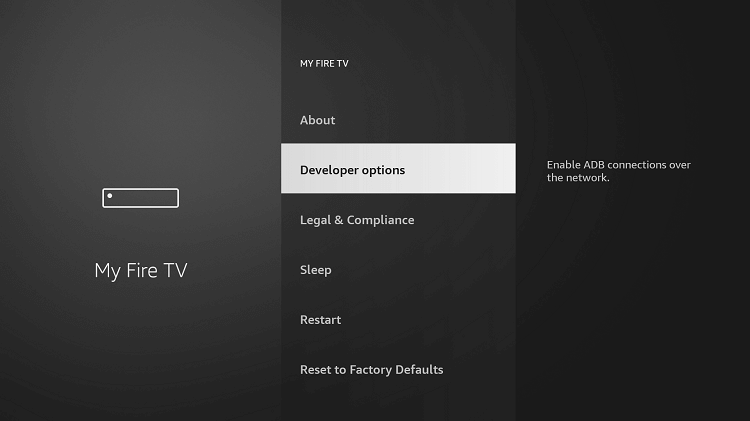
    • Go to Settings then select My Fire TV.
    • Click on the Developer options and choose Apps from Unknown Sources.
    • Click Turn On to enable sideloading. 
    • Now go back to the home screen of your FireStick.
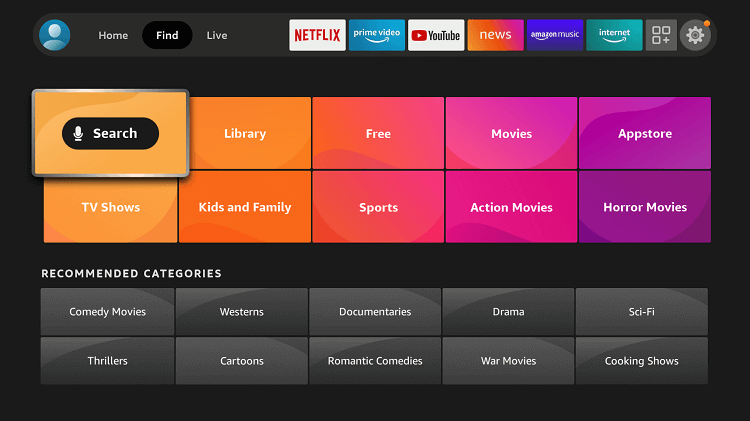
    • Click Find and then the Search option from the menu.
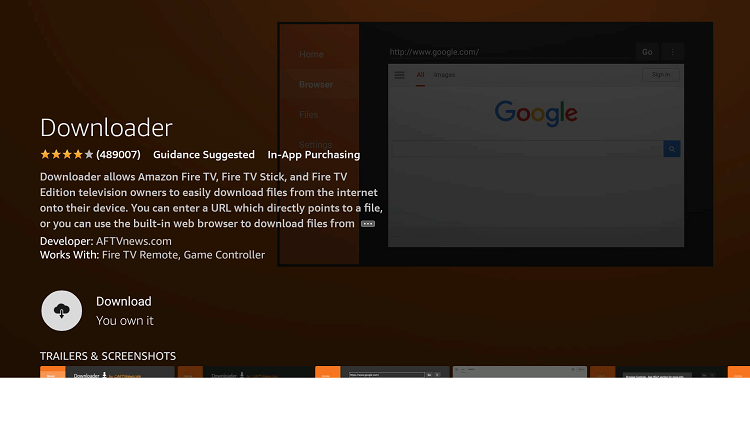
    • Type and search Downloader in the given search bar.
    • Choose the Downloader app under the Apps & Games section.
    • Click on Download or Get and wait for the app to be installed.
    • Click on Download or Get and wait for the app to be installed.
    • Click Open once the app is installed.
    • Click Allow if Downloader asks to access your photos, media, and files.
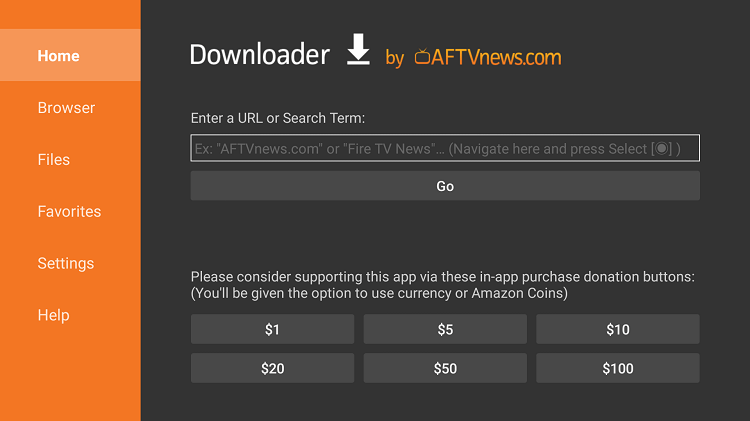
    • Now click on the URL Search bar and type this URL (tinyurl.com/ladeportes14) to download La Deported APK and then click Go. 
    • type this URL (tinyurl.com/ladeportes14) to download La Deported APK and then click Go. 
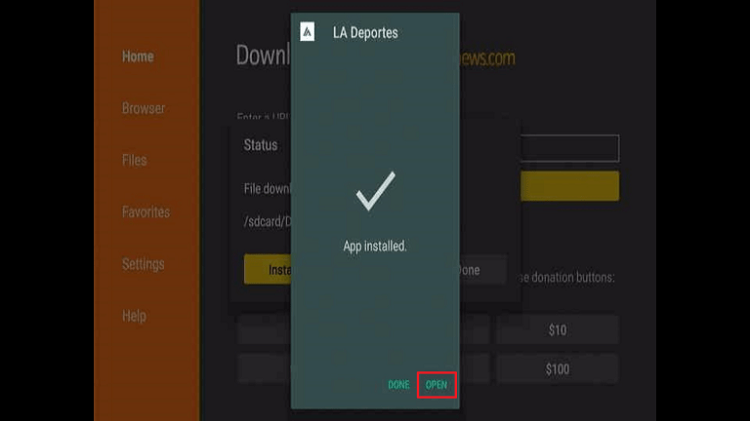
    • Wait for the APK to download then click Install when prompted.
    • Click Open to launch the La Deportes on your FireStick.
    • click open to launch la Desportes APK

    Should I use La Deportes with a VPN?

    Using a VPN with the La Deportes app is recommended for security and privacy reasons. When you stream live sports events through a free app, your ISP and other third-party entities can track your online activities. This can pose a potential risk to your online privacy and security.

    By using a premium VPN service, your IP is encrypted, and your online activities are kept private. This can help you avoid geo-restrictions that may be in place for certain sports events, allowing you to access them from anywhere in the world.

    Furthermore, since the La Deportes app provides free access to live sporting events, it may not have the proper licensing rights for all the content it streams. This could potentially put you at risk of legal issues if caught. Using a VPN like ExpressVPN can help you hide your online activities from prying eyes, reducing the risk of any legal repercussions.

    Additionally, You can experience buffer-free streaming. That’s why you should always use a reliable VPN such as ExpressVPN. 

    Here’s a quick setup guide:

    How to Install ExpressVPN on FireStick?

    1. Get ExpressVPN for FireStick.
    2. Download & Install the app on your device.
    3. Launch the app and connect to the US server.
    4. Launch La Deportes & enjoy streaming.

    Get ExpressVPN

    La Deportes Alternatives

    Here are some similar sports streaming apps that you can get on your FireStick:

    • VIPRow Sports 
    • Rapid Streamz
    • Lepto Sports 
    • fuboTV
    • StreamEast
    • Stream2Watch

    Frequently Asked Questions

    • What is La Deportes APK?

      La Deportes is a free live sport streaming app. The app offers various live sports, including cricket, football, basketball, and volleyball, among others. Since this app is not available on the official Amazon App Store, you’ll have to sideload the app.

    • Is La Deportes safe and legal?

      The app seems to be safe but its legality depends on the country you are accessing it from. La Desportes being a free app could be illegal in some regions. Therefore, it is recommended to use a VPN service like ExpressVPN to stay anonymous while streaming. 

    • Is La Deportes ad free?

      Yes, there are no ads on the La Deportes app. You can enjoy streaming your favorite sporting events without the annoying ads.

    Conclusion

    In conclusion, La Deportes APK is a great streaming app for sports enthusiasts who want to watch their favorite live sports events on FireStick. With a simple and minimal interface, and HD-quality streaming, La Deportes provides an uninterrupted sports streaming experience. 

    However, since the app provides free access to live sports events, using a VPN like ExpressVPN is recommended for security and privacy reasons. Additionally, we have provided a quick setup guide for those who want to install La Deportes on FireStick.

    Lastly, we have suggested some La Deportes alternatives and answered some frequently asked questions about the app.

    Get ExpressVPN
    Bilal Khalid

    Related Posts

    How to Install Fluxus IPTV Addons on FireStick and Android TV

    Channels Apps & IPTV

    Watch Latest Release 2024 Movies on FireStick (For Free)

    Channels Apps & IPTV

    How to Install STV Player on FireStick and Android TV

    Channels Apps & IPTV

    Watch and Download Shack TV On Firestick

    Channels Apps & IPTV
    Recent Posts
    • How to Get Dedicated IP in the UK
    • How to Get Dedicated IP in India
    • A Comprehensive Guide to Obtaining a Dedicated IP in the US
    • Setup Linksys Wireless Router with DedicatedIP Address
    • Setting Up a Dedicated IP Address on Netgear XR500

    We talk about almost everything around Amazon Fire Stick. Be it Apps, How to guides, Sports, Troubleshooting, latest news.

    Disclaimer: We may earn affiliate commissions if you decide to purchase through our links. For more details read our Ownership Disclosure.

    Facebook YouTube
    Latest Posts

    How to Get Dedicated IP in the UK

    March 12, 2024

    How to Get Dedicated IP in India

    March 12, 2024

    A Comprehensive Guide to Obtaining a Dedicated IP in the US

    March 8, 2024
    Explore by category
    • Channels Apps & IPTV
    • Dedicated IP
    • News
    • Sports Movies & Shows
    • Tips Tricks & Features
    • uncategorized

    Type above and press Enter to search. Press Esc to cancel.