


Firestick MentorFirestick Mentor
    What's Hot

    How to Get Dedicated IP in the UK

    March 12, 2024

    How to Get Dedicated IP in India

    March 12, 2024

    A Comprehensive Guide to Obtaining a Dedicated IP in the US

    March 8, 2024
    • Privacy Policy
    • Contact Us
    Facebook YouTube
    Firestick MentorFirestick Mentor
    • Sports Movies & Shows
    • Channels Apps & IPTV
    • Tips & Tricks
    • VPN
    Firestick MentorFirestick Mentor
    Home » Channels Apps & IPTV » How to Watch 9anime on FireStick
    Channels Apps & IPTV

    How to Watch 9anime on FireStick

    Bilal KhalidBy Bilal KhalidFebruary 3, 2023Updated:January 3, 2024No Comments5 Mins Read
    watch 9anime on firestick
    Facebook Twitter LinkedIn Email

    Welcome to the world of anime enthusiasts! If you’re a dedicated follower of the vibrant and diverse anime universe, you’ll be thrilled to know that you can now bring your favorite anime series and movies directly to your Firestick.

    The seamless integration of streaming services has made it easier than ever to access a vast library of anime content on your big screen.

    In this guide, we’ll explore how you can elevate your anime-watching experience on Firestick, unlocking a realm of captivating stories, breathtaking animation, and unforgettable characters at the touch of your remote. Whether you’re a seasoned anime aficionado or just diving into this exciting world, the Firestick opens up a portal to endless anime adventures. Let’s embark on this journey and discover the best ways to watch 9anime on your Firestick, ensuring you never miss a moment of your favorite anime tales.

    Get ExpressVPN

    What is 9anime?

    It is a free anime streaming website that offers a wide selection of dubbed and subtitled anime. It merely links to the information rather than hosting it. 

    Therefore, using 9Anime for streaming is both safe and legal. It provides users with a timetable of the shows that will air for the coming week and is up to date with the most recent titles. 

    There are always HD video formats available, up to 1080p. This is among the greatest sites available on FireStick, as you can easily watch anime while enjoying its beautiful visuals and animations.

    Features of 9anime

    9anime is one of the best anime streaming applications on the internet, and this is due to various reasons. 

    One of the most standout features is that their site is very user-friendly as the site is very easy to navigate while searching for content. 

    The second feature is diversity, as there is a lot of content available on their site. Ranging from different genres and various dubs, almost everything related to anime is available on their site. 

    The last but not least point is that almost all anime are available and up to date.
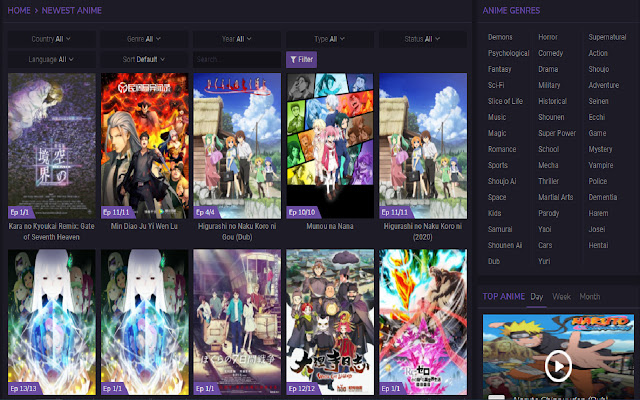
    The different types of genres that are available on it are:

    • Slice of Life
    • Action
    • Romance
    • Comedy
    • Horror
    • Samurai
    • School
    • Drama
    • Fantasy
    • Historical

    There are many other additional subgenres that are associated with the ones written above.

    Watch 9anime on FireStick Using Silk Browser?

    You can easily get 9anime on your Amazon FireStick by following the steps that are mentioned below:

    • Go to your Amazon FireStick device, and go to click the find option.
    • After selecting find, you can go to the search option.
    • There type in Silk Browser and select the first option that prompts up.
    • Download the application, and wait for it to install.
    • After the installation procedure is finished, open it up and type in https://www.12.9anime.to/home.
    • Now you can easily watch anime anytime you want to.

    Alternative Websites to Watch 9Anime on Firestick 

    There are a number of anime-based streaming platforms available, but only some are close to the level of 9anime. Some of the possible alternatives are mentioned below:

      • AnimeHeros

    Similar to 9Anime, AnimeHeros provides its customers with a wide selection of free anime series and episodes. Additionally, it allows users to download and view high-quality videos for free.

    This website is also user-friendly and accessible to everyone thanks to its clear and uncluttered interface. Users can easily access this website at any time of day and view shows that have been dubbed or subbed in any language.

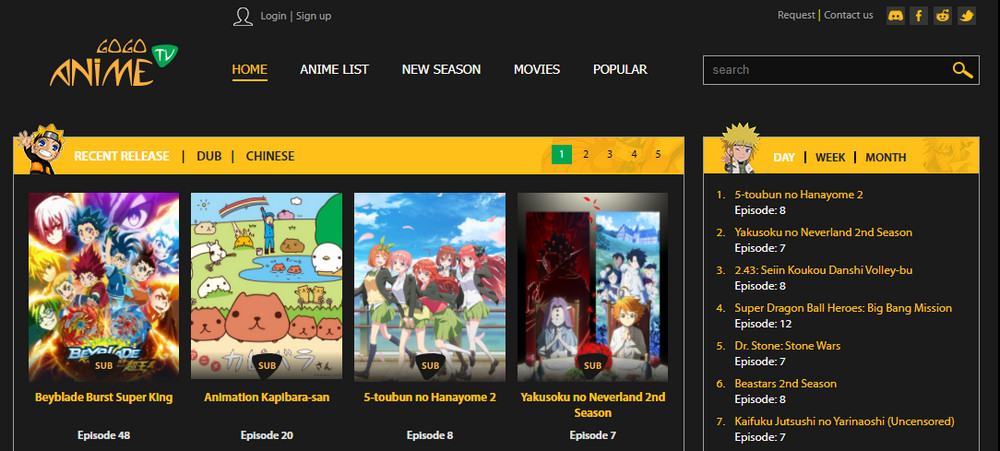
      • GoGoAnime

    GoGoAnime is the ideal platform if you want to stream anime in high definition at multiple resolutions. The fact that GoGoAnime is an interactive website that solicits user suggestions is one of its distinguishing features. 

    Additionally, it offers excellent customer service, which assists in quickly responding to viewers’ questions.

      • Crunchyroll

    Crunchyroll is also another well-liked and favored streaming website. As a result, this website is the best choice if you want a flawless dubbing experience. 

    The website offers no-ad anime shows in resolutions lower than 480p, which you may easily skip.

    Should I use a VPN to Watch 9anime with Firestick?

    Internet browsing can be hazardous due to the ongoing possibility of being hacked. Downloading APK files is also troublesome because they are sometimes unlawful and hazardous. 

    If you accidentally download one of the same APK files that hackers routinely create for reputable websites, your smartphone may be harmed. 

    Using a reputable VPN is the greatest way to prevent virus penetration when engaging in such activities. Despite the fact that there are numerous VPNs available, only a select few, such as ExpressVPN, provide comfort, dependability, and quick speed. 

    By using a high-end VPN, you can easily watch anime on the 9anime application without a hassle, as the stream will be buffer free. It’s easy to download the ExpressVPN app for your Amazon FireStick via the downloader or the app store.

    Best VPN for 9 Anime

    One of the most convenient VPNs in the market is ExpressVPN. It is easy to use, has a number of servers available, and has affordable rates. 

    ExpressVPN supports apps for Windows, Mac, Android, iOS, Linux, and other operating systems, as well as a custom firmware for many routers, thorough manual setup instructions for Apple TV, Fire TV, PlayStation, Chromebooks, Kindle Fire, and other devices, and more.

    Get ExpressVPN
    Bilal Khalid

    Related Posts

    How to Install Fluxus IPTV Addons on FireStick and Android TV

    Channels Apps & IPTV

    Watch Latest Release 2024 Movies on FireStick (For Free)

    Channels Apps & IPTV

    How to Install STV Player on FireStick and Android TV

    Channels Apps & IPTV

    Watch and Download Shack TV On Firestick

    Channels Apps & IPTV
    Recent Posts
    • How to Get Dedicated IP in the UK
    • How to Get Dedicated IP in India
    • A Comprehensive Guide to Obtaining a Dedicated IP in the US
    • Setup Linksys Wireless Router with DedicatedIP Address
    • Setting Up a Dedicated IP Address on Netgear XR500

    We talk about almost everything around Amazon Fire Stick. Be it Apps, How to guides, Sports, Troubleshooting, latest news.

    Disclaimer: We may earn affiliate commissions if you decide to purchase through our links. For more details read our Ownership Disclosure.

    Facebook YouTube
    Latest Posts

    How to Get Dedicated IP in the UK

    March 12, 2024

    How to Get Dedicated IP in India

    March 12, 2024

    A Comprehensive Guide to Obtaining a Dedicated IP in the US

    March 8, 2024
    Explore by category
    • Channels Apps & IPTV
    • Dedicated IP
    • News
    • Sports Movies & Shows
    • Tips Tricks & Features
    • uncategorized

    Type above and press Enter to search. Press Esc to cancel.