



What is OTTOcean IPTV?
OTTOcean IPTV is a popular Internet Protocol Television (IPTV) service that offers a wide range of television programming and video content delivered over an Internet connection. It provides users access to an extensive selection of live TV channels, on-demand content, and interactive features. With OTTOcean IPTV, viewers can enjoy their favourite shows, movies, sports events, news, and other entertainment options through a set-top box or compatible devices. The service uses internet protocols to deliver high-quality video streaming directly to users, bypassing the need for traditional cable or satellite connections.
Features of OTTOcean IPTV:
- Extensive Content Library: OTTOcean provides a vast collection of live TV channels, on-demand content, and movies, catering to diverse preferences and interests.
- Multi-Device Compatibility: Users can access the IPTV on various devices, including streaming devices, smart TVs, smartphones, tablets, and computers.
- High-Quality Streaming: OTTOcean offers high-definition streaming, providing users with an immersive and enjoyable viewing experience.
- User-Friendly Interface: Users may easily navigate between channels and material, create playlists, and manage preferences because of the service’s user-friendly design.
- Time-Shifted Viewing: This IPTV supports time-shifted viewing, allowing users to watch their favourite shows conveniently by rewinding, pausing, or fast-forwarding live TV broadcasts.
OTTOcean IPTV Channels list:
The IPTV service provides access to a variety of live TV channels, including but not limited to:
- TNT
- FX
- HBO
- INSP
- VH1
- SyFy
- Cartoon Network
- BBC America
- Start TV
- Newsy
- Comedy TV
- ITV
- All 4
- BBC Sport
- Sky Sports
- Sky Showcase
- 4Seven
- BT Sport
- Euro Sport
- Sky Anytime
- Sky2
- Al Jazeera
- Alibi Channel
- GAC
- Golf
- TV One
- Galavision
- Showtime
- TUDN
- Tru TV
How to Install OTTOcean IPTV on FireStick:
To use OTTOcean IPTV on FireStick, follow these instructions:
- On your FireStick home screen, navigate to the “Settings” tab.
- Scroll right and select “My Fire TV” or “Device” (depending on your FireStick version).
- Choose “Developer Options” and enable “Apps from Unknown Sources” and “ADB debugging.”
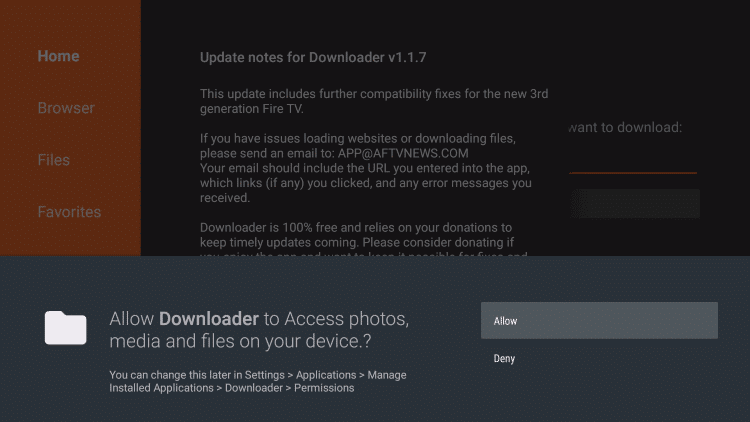
- Return to the home screen and search for the “Downloader” app.
- Install the Downloader app and launch it.
- Enter the URL of the official OTTOcean IPTV APK file and initiate the download process. (https://bit.ly/3MV5xHc) M3U URL
- Once downloaded, install the OTTOcean IPTVAPK file by following the on-screen prompts.
- After installation, access OTTOcean IPTV from your FireStick’s “Apps & Channels” section and enjoy your favourite content.
Why is OTTOcean IPTV unavailable outside the US
Content licensing involves acquiring the rights to distribute specific TV channels, on-demand content, and movies in different regions.
Negotiating and securing licensing agreements can be complex and time-consuming, involving negotiations with content providers and complying with local regulations and copyright laws.
OTTOcean IPTV may be expanding its reach to other countries, but it takes time to establish these agreements and ensure compliance with the legal requirements of each region.
Furthermore, certain countries may have stricter regulations or licensing requirements for streaming services, making it more difficult for OTTOcean IPTV to operate outside the US.
How to sign up for OTTOcean IPTV outside of the US (Using ExpressVPN):
To access OTTOcean IPTV outside of the US, users can follow these steps:- Subscribe to ExpressVPN which offers a wide range of server locations.
- Download and install the VPN app on your preferred device.
- Launch the VPN app and connect to a server in a country where OTTOcean IPTV is available.
- Once connected to the VPN, visit the official OTTOcean IPTV website and sign up for an account.
- Follow the registration process and provide the necessary details to complete the sign-up.

Easy Access: Ott Ocean IPTV Sign-Up
1. Visit Ott Ocean’s official website using a web browser.
2. Scroll down and pick a subscription plan, then click on the Get Subscription Now button.

3. Choose the device where you want to watch live TV and click Continue.

4. Review your order and click the “Checkout” button.

5. Enter your billing details, choose your payment method, and apply any Ott Ocean promo code if you have one.
6. Click the Complete Order button.

7. Finish the payment process to activate your subscription.
Once you finish these steps, you’ll receive the M3U Playlist link in your email.
What Other Devices are Compatible with OTTOcean IPTV
In addition to FireStick and Android TV, OTTOcean IPTV can be installed on various other devices, including:- Smartphones and tablets: Android and iOS devices support the installation of OTTOcean IPTV through their respective app stores.
- Computers: OTTOcean IPTV can be accessed through web browsers on Windows, Mac, and Linux systems by visiting the official OTTOcean IPTV website.
- Smart TVs: Depending on the brand and operating system, many smart TVs have dedicated app stores where you can find and install OTTOcean IPTV.
- Streaming devices: OTTOcean IPTV is compatible with popular streaming devices like Roku, Apple TV, and Chromecast, allowing users to enjoy their favourite content on these platforms.
Why ExpressVPN is a Must
ExpressVPN is crucial for accessing OTTOcean IPTV outside the US and enjoying free streaming worldwide. Here’s why it is highly recommended:-
Stream OTTOcean IPTV outside of the US:
ExpressVPN allows users to bypass geographical restrictions imposed on OTTOcean IPTV within the US. By connecting to one of ExpressVPN’s servers in a country where OTTOcean IPTV is available, users can effectively mask their IP address and appear to be accessing the service from a supported location. This enables seamless access to OTTOcean IPTV and ensures uninterrupted live TV channels, on-demand content, and movie streaming. -
Watch Any Movie Anywhere in the World:
ExpressVPN offers global coverage with a vast network of servers across different countries. This means you can link to servers in various regions, bypassing content restrictions and watching any movie from anywhere in the World. Whether it’s a movie only available in certain countries or a film released earlier in a different region, ExpressVPN allows you to access and enjoy a wide range of movies from other streaming platforms. -
Security and Privacy:
In addition to unblocking geo-restricted content, ExpressVPN provides robust security features that protect your online privacy. The service encrypts your internet traffic, safeguarding it from potential eavesdroppers and hackers. With ExpressVPN, your data remains secure and private, ensuring a safe streaming experience. -
Fast and Reliable Streaming:
ExpressVPN is known for its high-speed connections and reliable performance. This is essential for streaming OTTOcean IPTV and watching movies without buffering or interruptions. The service’s optimized servers and advanced technology minimize latency, providing a smooth and seamless streaming experience. -
Multi-Device Compatibility:
ExpressVPN supports various devices, including smartphones, tablets, computers, smart TVs, and streaming devices. This versatility allows you to protect and connect multiple devices simultaneously, ensuring you can enjoy OTTOcean IPTV and access movies from anywhere, regardless of your device.

Frequently Asked Questions
-
Can I use ExpressVPN with OTTOcean IPTV on multiple devices simultaneously?
Yes, ExpressVPN offers simultaneous connections, which means you can use it on multiple devices simultaneously. This allows you to enjoy OTTOcean IPTV on one device while simultaneously securing your internet connection on another device. -
Are there bandwidth limitations when using ExpressVPN to stream OTTOcean?
ExpressVPN does not impose any specific bandwidth limitations. However, the speed you experience may vary based on your internet and the distance to the VPN server you are connected to. To optimize your streaming experience, choose a server with a low latency rate and a location close to your site. -
Will using ExpressVPN impact my streaming quality when accessing OTTOcean?
ExpressVPN is designed to provide fast and reliable connections, which should not significantly impact your streaming quality. However, as with any VPN service, there may be a slight decrease in speed due to the encryption process. Choosing a nearby server and connecting to a high-speed internet connection minimize any potential impact on streaming quality. -
Can I use ExpressVPN to access other geographically restricted streaming services besides OTTOcean IPTV?
Yes, ExpressVPN can access a wide range of geographically restricted streaming services. It bypasses restrictions and lets you enjoy content from platforms like Netflix, Hulu, and BBC iPlayer. ExpressVPN’s extensive server network ensures you can access content from various regions around the World. -
Is ExpressVPN legal for accessing OTTOcean IPTV and streaming movies?
Using ExpressVPN to access OTTOcean IPTV or watch movies is typically legal. It is crucial to remember that viewing copyrighted content may be legal or illegal depending on the nation and jurisdiction. It is always advised to follow local rules and ordinances and to use legal channels to get content.