
Firestick MentorFirestick Mentor
    What's Hot

    How to Get Dedicated IP in the UK

    March 12, 2024

    How to Get Dedicated IP in India

    March 12, 2024

    A Comprehensive Guide to Obtaining a Dedicated IP in the US

    March 8, 2024
    • Privacy Policy
    • Contact Us
    Facebook YouTube
    Firestick MentorFirestick Mentor
    • Sports Movies & Shows
    • Channels Apps & IPTV
    • Tips & Tricks
    • VPN
    Firestick MentorFirestick Mentor
    Home » Channels Apps & IPTV » Watch Thunder TV on FireStick—25,000 IPTV Free Channel Updates
    Channels Apps & IPTV

    Watch Thunder TV on FireStick—25,000 IPTV Free Channel Updates

    Bilal KhalidBy Bilal KhalidNovember 22, 2023Updated:January 16, 2024No Comments7 Mins Read
    How to Download and Install Thunder TV on Firestick.jpg
    Facebook Twitter LinkedIn Email

    What Is Thunder TV?

    Check out Thunder TV for all your live TV and on-demand needs with the Thunder TV APK on Firestick. This IPTV service hooks you up with a whopping 25,000+ live TV channels covering everything from entertainment and news to kids’ stuff, travel, and lifestyle content.

    Thunder TV doesn’t compromise on sports, offering a mix of local and international sports channels in HD and full HD quality. Its user-friendly interface and global servers ensure a seamless and reliable streaming experience with the Thunder TV APK on your Firestick.

      • Free software updates

      • Quick and buffer-free links

      • Flexible and affordable subscription plans

      • 7-day money-back guarantee

    To get Thunder TV IPTV on your FireStick, you’ll need to sideload the APK using the Downloader app.

    Is Thunder TV free

    No, Thunder TV is not a free service. It offers flexible subscription plans for users to access its extensive selection of over 25,000 live TV channels. The subscription options include monthly, six-month, and yearly plans, each with its own pricing. While Thunder TV provides a 7-day money-back guarantee for users to assess the service, it is not available as a completely free streaming platform.

    How to Download And Install Thunder TV on FireStick

      1. Turn on your FireStick and head to the Find option on the Home screen.
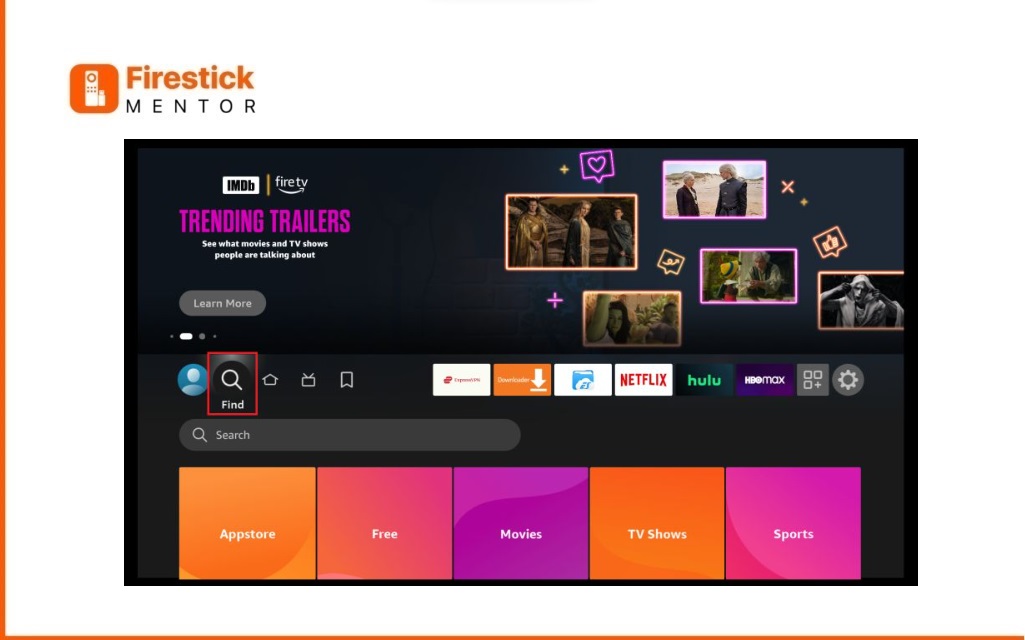
    Thunder-tv-apk-download-for-firestick-Step-1
      1. Click on Search, and you’ll see a virtual keyboard pop up.
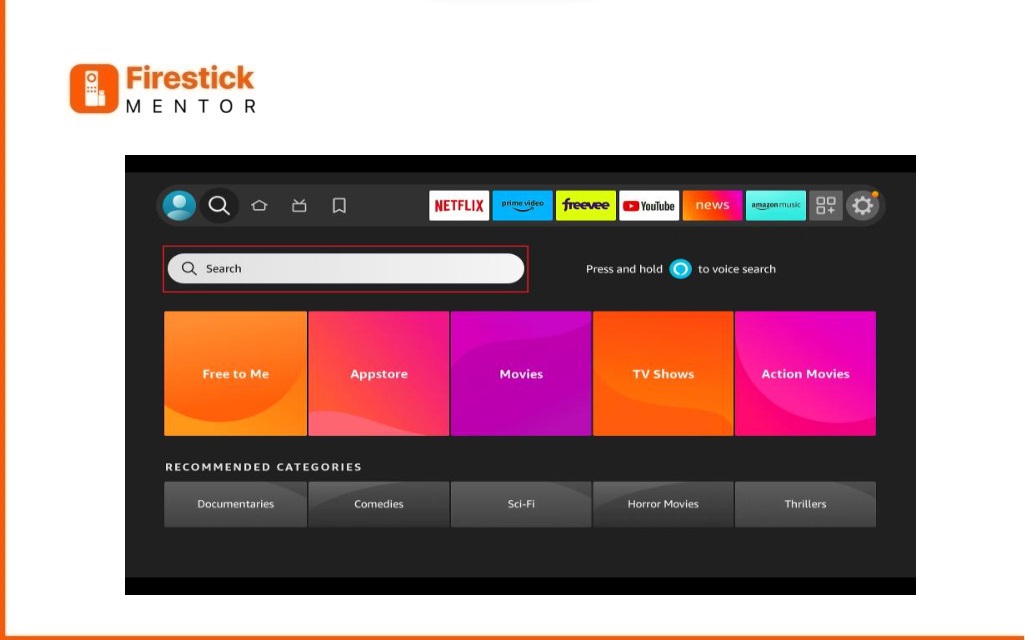
    Thunder-tv-apk-download-for-firestick-Step-2
      1. Type in Downloader or just ask Alexa to find it for you.

    Thunder-tv-apk-download-for-firestick-Step-3
      1. Choose Downloader from the suggestions that appear below the virtual keyboard.
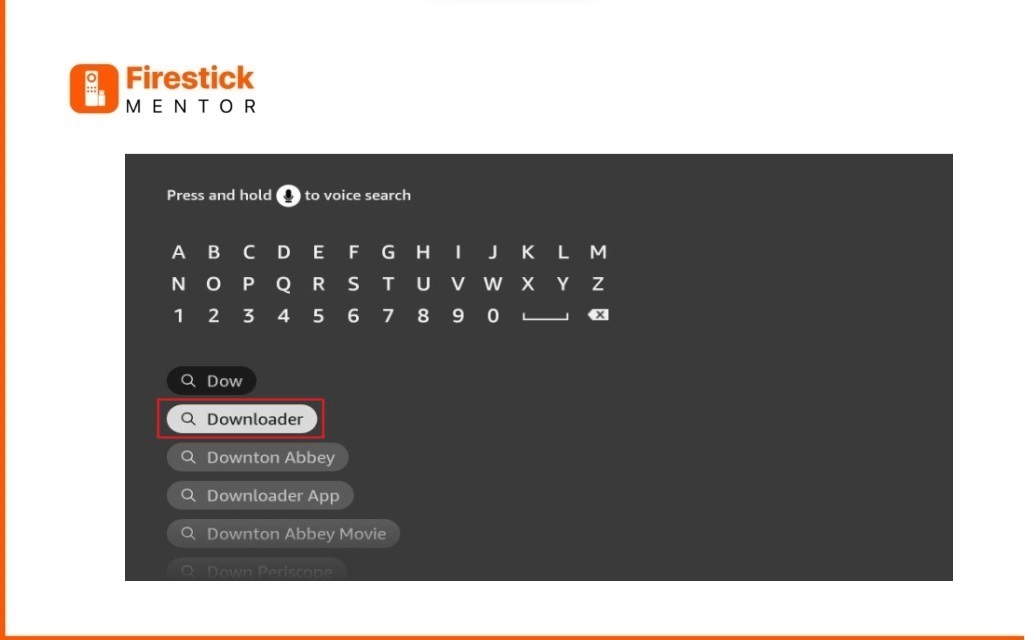
    Thunder-tv-apk-download-for-firestick-Step-4
      1. Look for Downloader in the search results. It has an Orange Background and falls under Apps and Games.
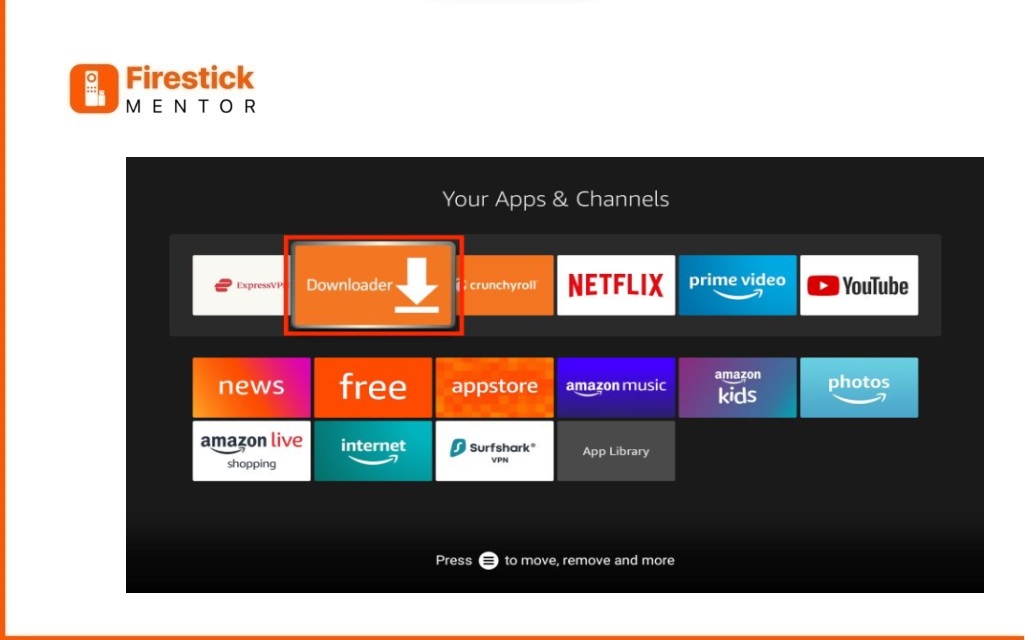
    Thunder-tv-apk-download-for-firestick-Step-5
      1. Press Get or Download. We’re using Downloader to help us add Thunder TV APK. Before that, let’s quickly change some settings on your FireStick.
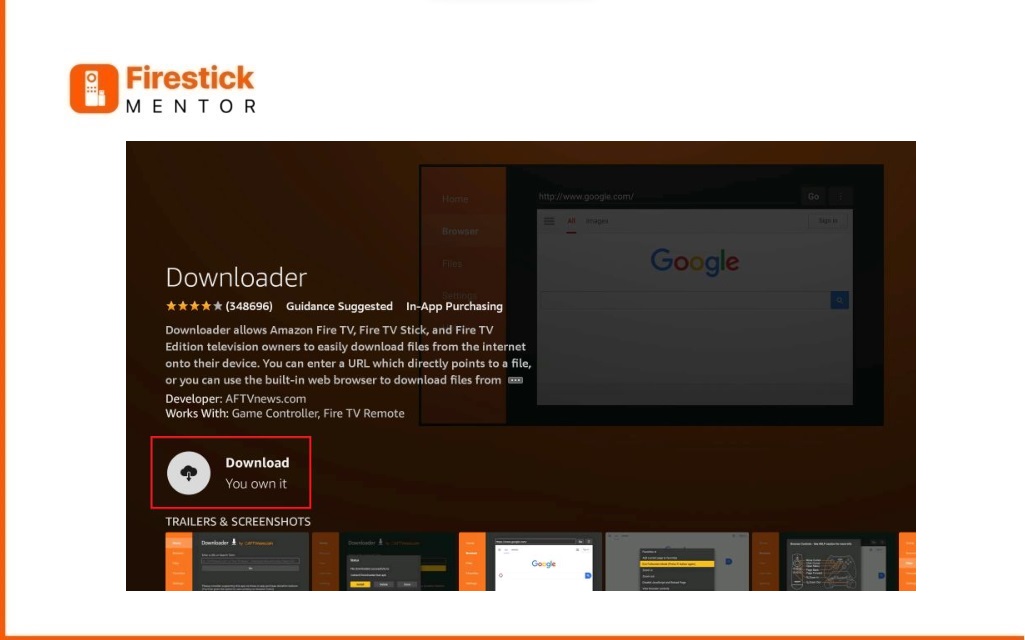
    Thunder-tv-apk-download-for-firestick-Step-6
      1. Press the home button on your FireStick remote, then Select Settings.
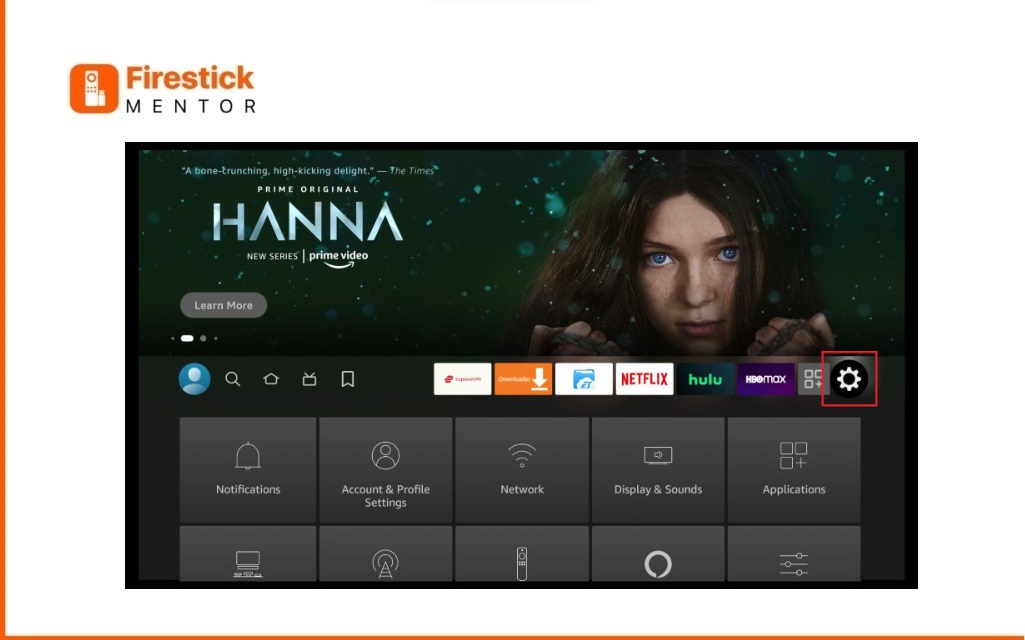
    Thunder-tv-apk-download-for-firestick-Step-7
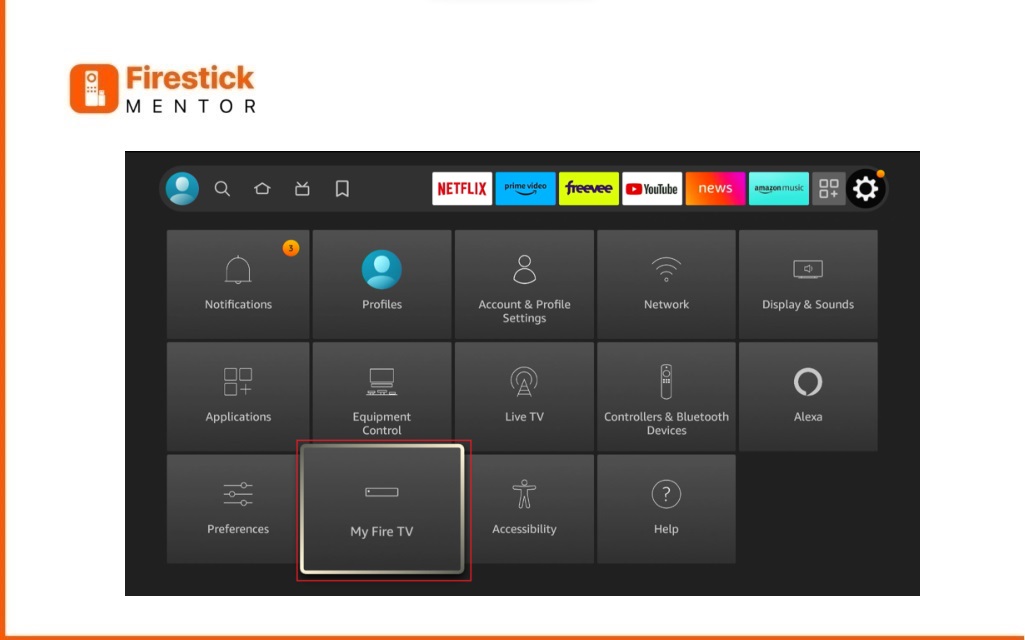
      1. Scroll down and pick My Fire TV.
    Thunder-tv-apk-download-for-firestick-Step-8
      1. Now, choose Developer Options.
    Thunder-tv-apk-download-for-firestick-Step-9
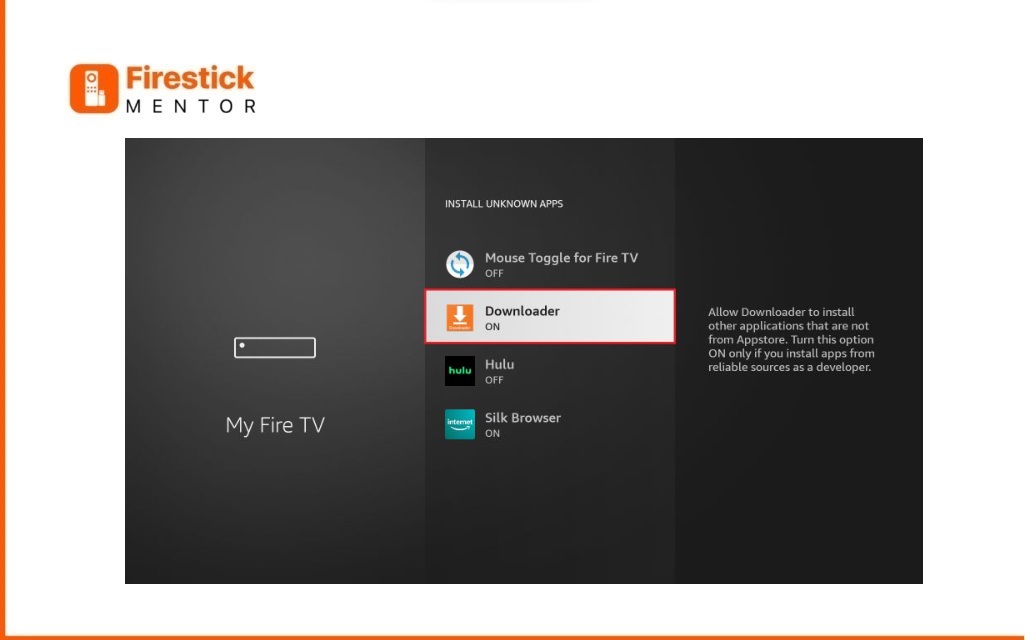
      1. Select Install Unknown Apps (if it’s not there, don’t worry, just skip to step 13).
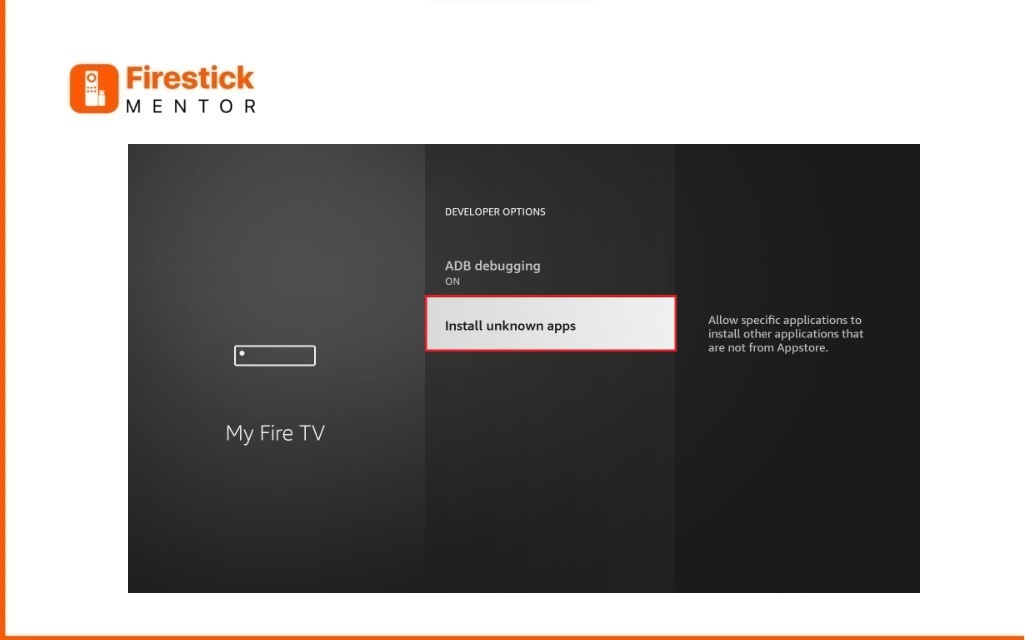
    Thunder-tv-apk-download-for-firestick-Step-10
      1. Find and switch on Downloader.
    Thunder-tv-apk-download-for-firestick-Step-11
      1. In case you see Apps from Unknown Sources, turn it ON (if you didn’t spot Install Unknown Apps in step 11). Once this is on, you’re all set to bring in apps from unknown sources.
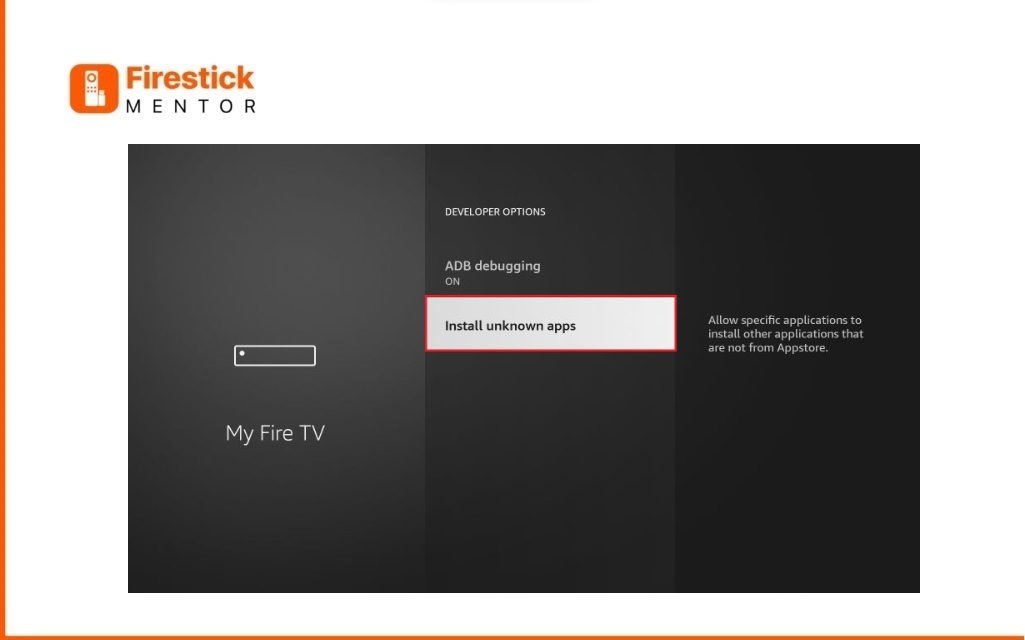
    In Case
      1. Hit the home button on your remote to head back to the FireStick home screen. Look for Downloader and open it.
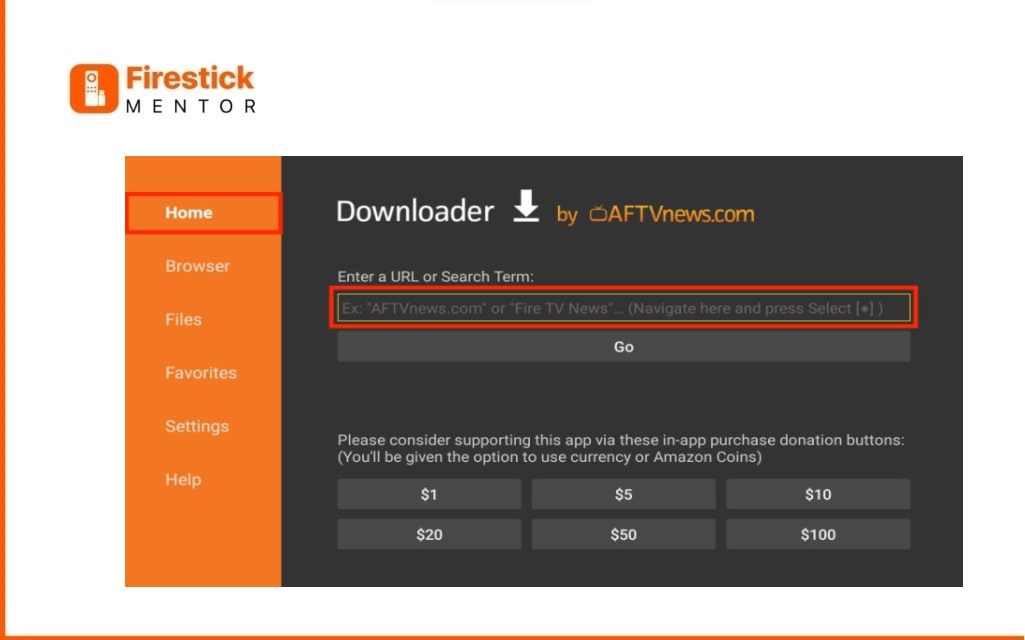
    Enter Your URL
      1. Now, type in the URL firesticktricks.com/thunder and hit Go.
    Type URL Press Go

    NOTE: FireStickMentor.com doesn’t keep any APKs. That URL we gave you? It’s a link to get the Thunder TV IPTV APK from somewhere else.

      1. Your system is grabbing the APK file for you. When it’s ready, just Select Install. 
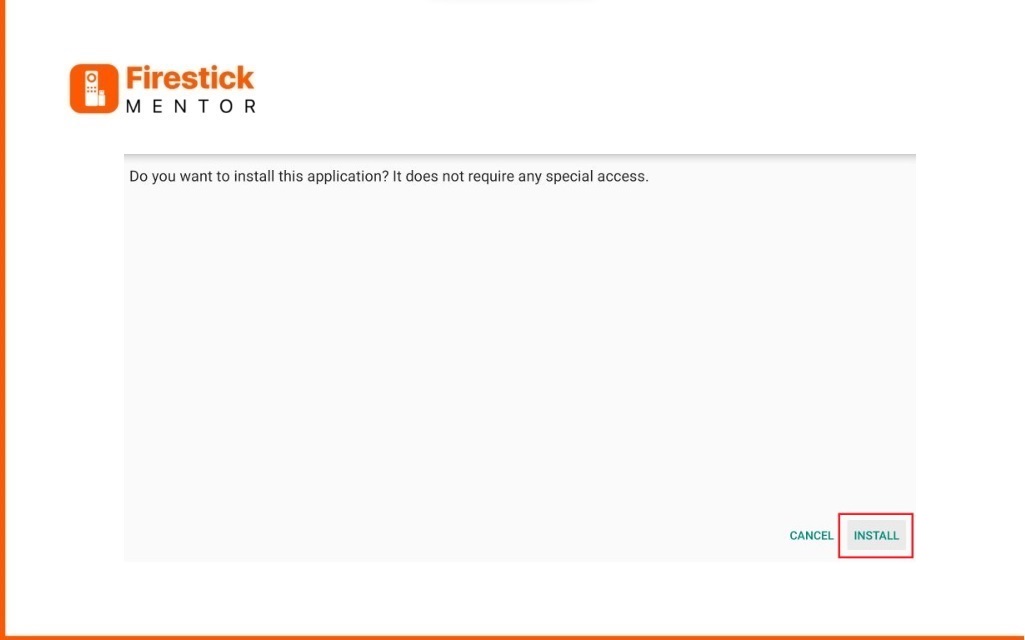
    Press install

    You’ve completed the installation of the Thunder TV app on your FireStick. Now, have fun using it with your preferred IPTV players.

    To watch Thunder TV in your area, make sure to connect to the server which hides your identity. It’s strongly recommended to use a VPN on your FireStick device.

    Our highly recommended VPN service for this is ExpressVPN.

    Express VPN for FireStick
    Get ExpressVPN

    How to Use Thunder TV on FireStick: [In 5 Easy Steps]

    As expected, signing up for Thunder IPTV on your FireStick isn’t a direct app sign-up. Simply get Thunder TV IPTV on your FireStick by heading to the official website, thunderiptv.net. From there, pick a single-day trial or opt for a monthly plan to kick off your Thunder TV IPTV experience.

      1. Go to the official website of Thunder TV and register your account there. Enter your email address and select the payment method.

    Go Thunder TV Website

    Note: Complete your payment through PayPal or credit/debit card, and you will receive the relevant details for your account, including your username, password, and M3U link.  

      1. Now open the Thunder TV app on your FireStick and enter your login details, Then Click Login.
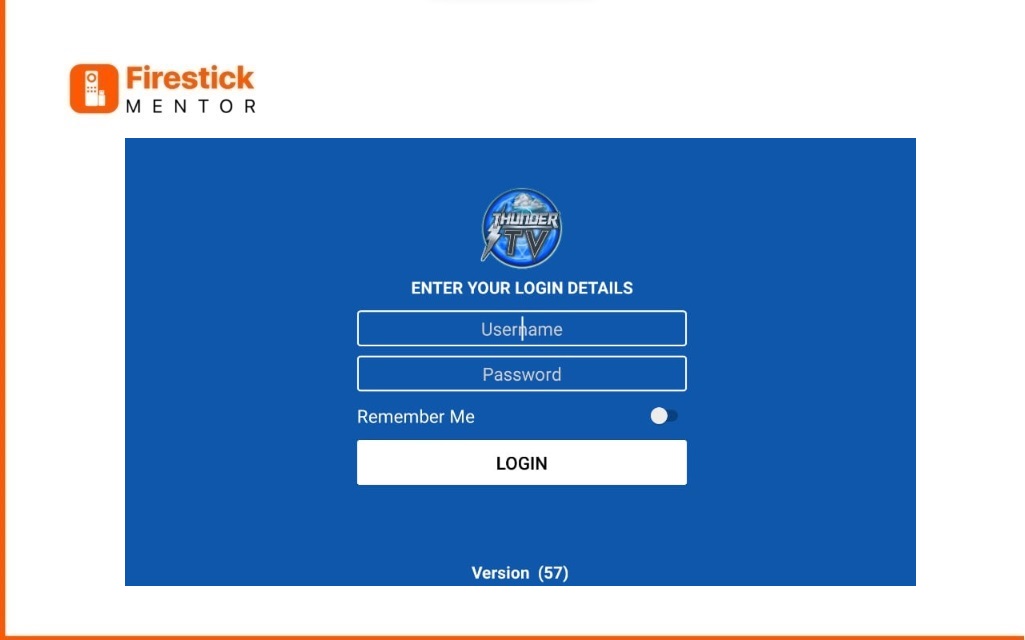
    Enter Your Login Details
      1. This is what the interface of Thunder TV will look like. Select any category and enjoy streaming.

    Enter Face of Thunder TV
      1. You can watch thousands of live channels of different categories and countries by clicking the Live TV option.

    List of channels on Thunder TV
      1. Live TV channels, movies, shows, and lots of other content from many countries can be streamed on Thunder TV.

    list of different channels on Thunder TV

    Thunder TV IPTV Overview and List of Compatible Devices

    Thunder TV boasts support for over 25,000 live TV channels, making it easy to find what you’re looking for. I had a smooth experience during my trial – the channels opened fast, and the streaming quality was superb. What’s cool is that Thunder TV supports subtitles in multiple languages. Just click the gear settings icon at the bottom right corner of the video player to enable them. Plus, it plays nice with almost every streaming device, including FireStick. It’s a versatile choice for your entertainment. Here are some cool things about Thunder TV, and it works on various devices, too.

    Certainly! Here’s a combined table for Thunder TV IPTV features and device compatibility:

    FeatureDescription
    Live TV Channels22,000+ channels for a wide range of content
    VPN FriendlySupports ExpressVPN on FireStick
    Sports ChannelsDiverse sports content to keep you in the game
    Entertainment ChannelsVariety of channels for your entertainment needs
    HD Quality SupportEnjoy high-definition quality on many channels
    M3U LinkProvides flexibility with M3U link
    IPTV Player CompatibleWorks smoothly with well-known IPTV players
    Subtitle SupportEnjoy content with added subtitles
    Favorites ManagerConvenient manager to keep track of your favorites
    24-Hour TrialTest the service with a 24-hour trial for €1 ($1.20)
    Device CompatibilityAvailable for FireStick, Android devices, Roku, Chromecast, Apple TV, Fire TV, iOS, Xbox One, Xbox 360, Samsung, LG, Dreamlink
    Features of Thunder TV and List of Compatible Devices

    Thunder TV packs a punch with these features and plays nice with a variety of devices!

    Why is My Thunder TV not working?

    If Thunder TV isn’t streaming smoothly, here are some simple solutions:

    1. Parsing the Package Error:

        If you see this error, it means Thunder TV is from a source FireStick doesn’t recognize. No worries. Here is a quick checklist to Fix Parsing the Package Error on FireStick.

        Quick Checklist:

      • Enable Unknown Sources.
      • Enable ADB Debugging.
      • Check for a corrupted APK file.
      • Ensure the APK file is virus-free.
      • Use the latest version of the APK.
      • Confirm compatibility with Firestick.
      • Update Firestick software regularly.
      • Reset to factory settings if needed.
    2. Clear the Cache:

      Sometimes, the app might lag or buffer. First, check your internet connection. If it’s good, the issue might be your device’s overloaded cache. Go to settings and clear your FireStick Cache.

    3. Upgrade to the Latest Version:

      If the above steps don’t fix it, your app might need an update. Open the app, look for the menu icon, and if there’s an update available, click to install it

      Easy fixes to keep your Thunder TV streaming smoothly.

    Access Thunder TV on Firestick: [in 2 Simple Steps]

    Thunder TV is a dependable and top-notch streaming service that has all your entertainment needs covered. If you enjoy live channels, you’ll find yourself using this app frequently.

    With the new FireStick interface, you can easily add up to six of your favorite apps to the home screen. Adding Thunder TV to this list ensures quick and convenient access whenever you want to enjoy your favorite content.

    1. Hold down the home button on your FireStick remote and choose Apps.
    2. Select App
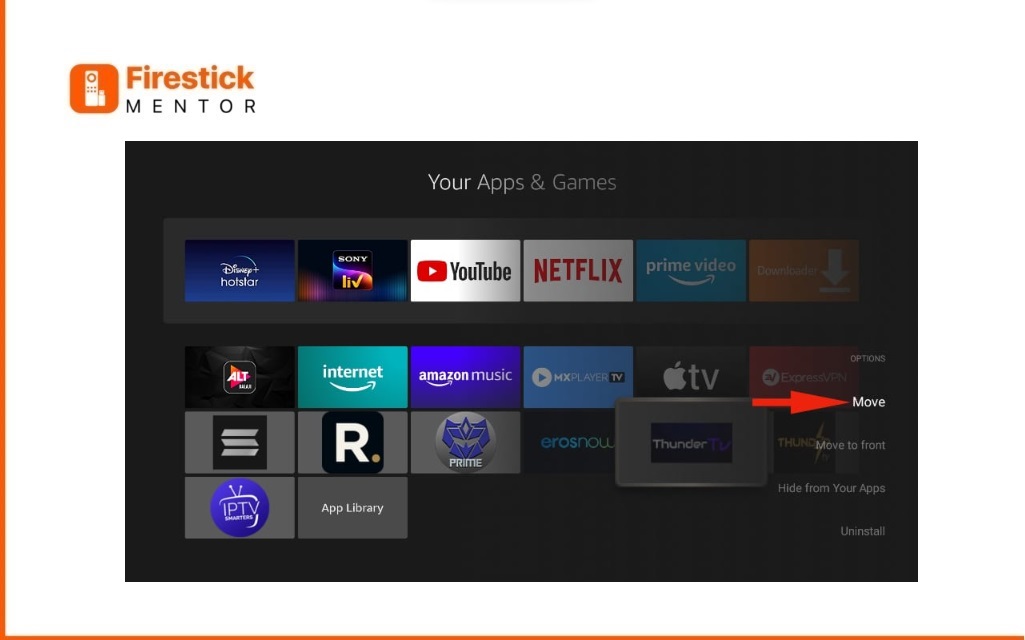
    3. Navigate to Thunder TV, press the options button, choose Move, place the app in the top row, and press the Select button on your remote to confirm its position.
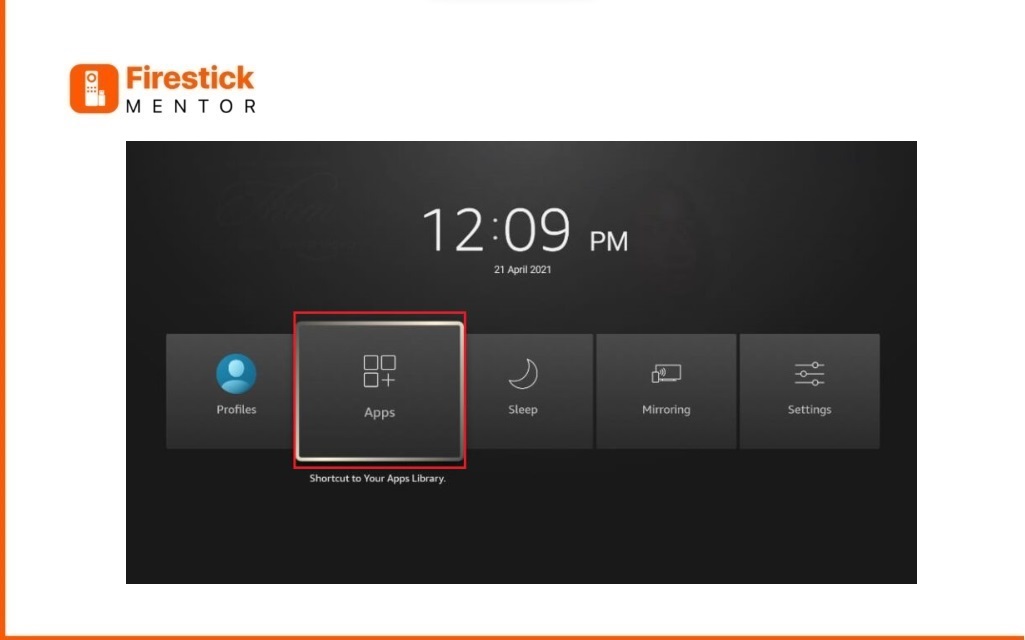
    4. Then Select Move

    FAQ’s

    • Why Thunder TV?

      Choosing Thunder TV comes with several benefits, including:

      1. Dependable and robust servers
      2. Access to over 25,000 channels
      3. Channels available in HD and FHD quality
      4. Compatibility with various devices
      5. Round-the-clock live support
    • How Much is Thunder TV?

      The company provides three subscription options:

      1. $10 per month
      2. $35 for six months
      3. $50 for one year
    • Is Thunder IPTV a Value-for-Money?

      Thunder IPTV is a good investment if you make the most of its features. Remember to use ExpressVPN on your FireStick to ensure your online activities remain private.

    Get ExpressVPN
    Bilal Khalid

    Related Posts

    How to Install Fluxus IPTV Addons on FireStick and Android TV

    Channels Apps & IPTV

    Watch Latest Release 2024 Movies on FireStick (For Free)

    Channels Apps & IPTV

    How to Install STV Player on FireStick and Android TV

    Channels Apps & IPTV

    Watch and Download Shack TV On Firestick

    Channels Apps & IPTV
    Recent Posts
    • How to Get Dedicated IP in the UK
    • How to Get Dedicated IP in India
    • A Comprehensive Guide to Obtaining a Dedicated IP in the US
    • Setup Linksys Wireless Router with DedicatedIP Address
    • Setting Up a Dedicated IP Address on Netgear XR500

    We talk about almost everything around Amazon Fire Stick. Be it Apps, How to guides, Sports, Troubleshooting, latest news.

    Disclaimer: We may earn affiliate commissions if you decide to purchase through our links. For more details read our Ownership Disclosure.

    Facebook YouTube
    Latest Posts

    How to Get Dedicated IP in the UK

    March 12, 2024

    How to Get Dedicated IP in India

    March 12, 2024

    A Comprehensive Guide to Obtaining a Dedicated IP in the US

    March 8, 2024
    Explore by category
    • Channels Apps & IPTV
    • Dedicated IP
    • News
    • Sports Movies & Shows
    • Tips Tricks & Features
    • uncategorized

    Type above and press Enter to search. Press Esc to cancel.