

Firestick MentorFirestick Mentor
    What's Hot

    How to Get Dedicated IP in the UK

    March 12, 2024

    How to Get Dedicated IP in India

    March 12, 2024

    A Comprehensive Guide to Obtaining a Dedicated IP in the US

    March 8, 2024
    • Privacy Policy
    • Contact Us
    Facebook YouTube
    Firestick MentorFirestick Mentor
    • Sports Movies & Shows
    • Channels Apps & IPTV
    • Tips & Tricks
    • VPN
    Firestick MentorFirestick Mentor
    Home » Channels Apps & IPTV » How to Install Live NetTV on FireStick and Android 
    Channels Apps & IPTV

    How to Install Live NetTV on FireStick and Android 

    Fatima AsifBy Fatima AsifJanuary 26, 2023Updated:December 8, 2023No Comments5 Mins Read
    Facebook Twitter LinkedIn Email

    There are many people all around the world who want to watch TV online but need to be made aware of reliable and authentic sources. Live NetTV is an application designed for people who want to enjoy and watch their favorite shows and movies online. 

    Live NetTV is the finest Android application for live streaming of various TV channels. The application also offers a quality selection option. Therefore, one can choose between quality depending on the needs.

    This article shows you the simplest method of utilizing a reliable VPN service to get access to all geographically restricted content available on Live NetTV. 

    How to Watch Live Net TV with ExpressVPN on FireStick?

    1. Get ExpressVPN .
    2. Download ExpressVPN app on FireStick.
    3. Launch the app and connect to a US server.
    4. Launch Live Net TV app and stream content without any restrictions!

    Get ExpressVPN

    What is Live NetTV?

    Live Net TV Logo

    Live NetTV is an exciting TV streaming application for Android users.

    Live NetTV APK for Android enables users to stream more than 700 TV channels. It is a user-friendly application that makes people busy so they can watch their favorite content without getting bored.

    An Android device must be version 4.1 or higher to use this service. There are nine information and entertainment channel categories, including one for children, religion, cooking, music, documentaries, movies, sports, and entertainment. Several streaming links make it possible to watch channels and programs without interruption. 

    There are no ongoing monthly fees, and it is free from advertisements. It offers a mechanism for on-demand media distribution. Indeed a vast collection of top-notch old- and new-age television programs and movies.

    How to Install Live NetTV for Android, APK, and FireStick?

    Live NetTV APK is very simple and quick to install for Android phones and FireStick devices; by following these steps. 

    Install Live NetTV APK on an Android Device

    Install Live NetTV on an Android Device  by following the instructions that are provided below:

    • Open ‘Google‘
    • Search to download the Live NetTV application.
    • Use the file manager to open the apk file.
    • Enable installation from untrusted sources.
    • Select “Install” from the menu.
    • Utilize all of the application’s premium features.

    Install Live NetTV APK on an iOS Device

    You can also install Live NetTV on your Apple Device  by following these instructions:

    • Start by going to your device’s Safari.
    • On top, there should be a search bar. You must type live NetTV application.
    • Download the APK.

    As soon as you select this option, the download begins immediately.

    Install Live NetTV on FireStick

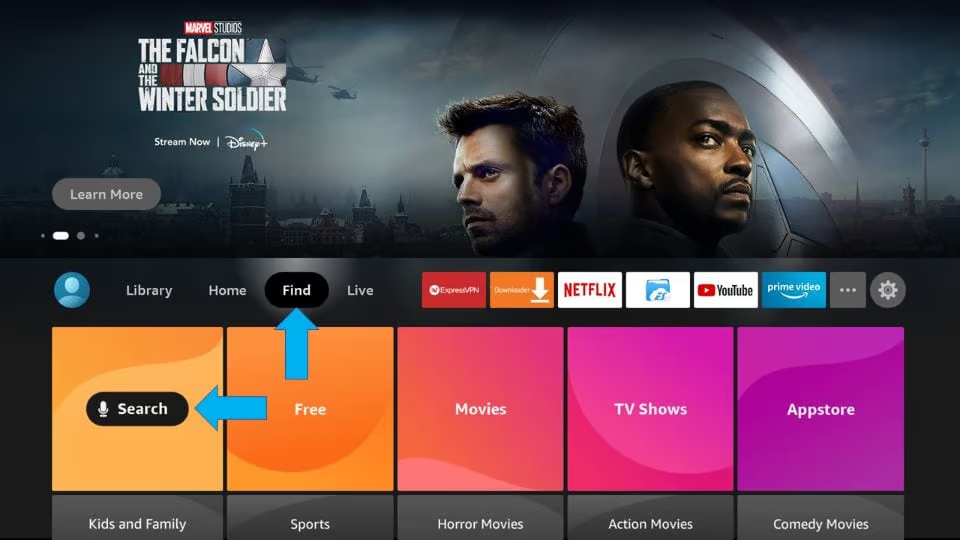
    • Go to the FireStick home screen. Find the option “Search.”
    • Go to the FireStick home screen. Find the option “Search."
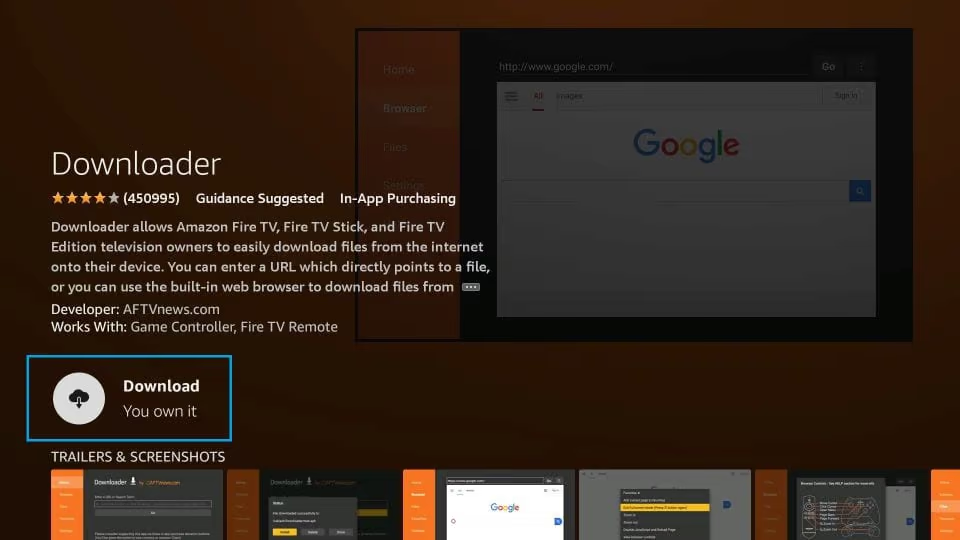
    • Search for the Downloader app and install it on your FireStick device.
    • Search for the Downloader app and install it on your FireStick device.
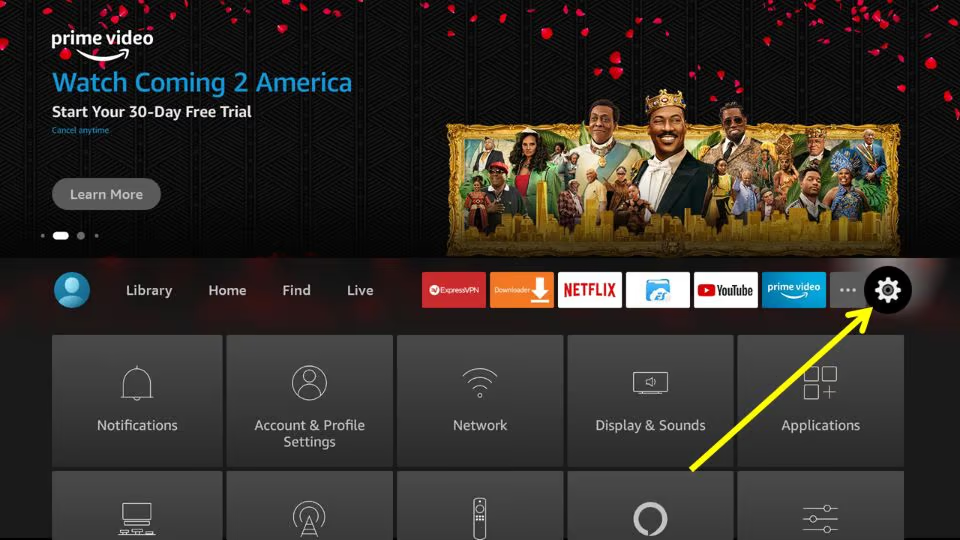
    • Now, return to the FireStick home screen and click Settings on the menu bar in the far right.
    • FireStick home screen and click Settings on the menu bar in the far right.
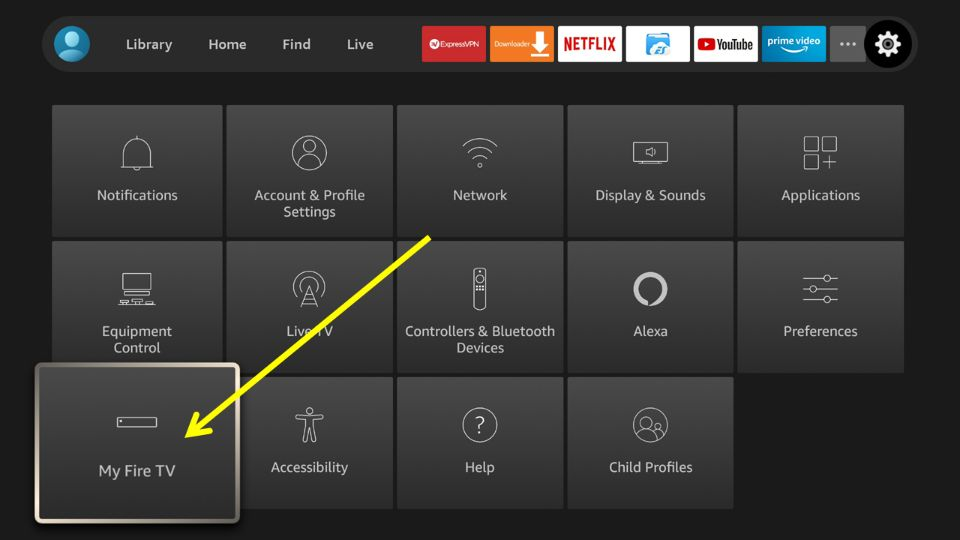
    • Click “My Fire TV“.
    • Click “My Fire TV"
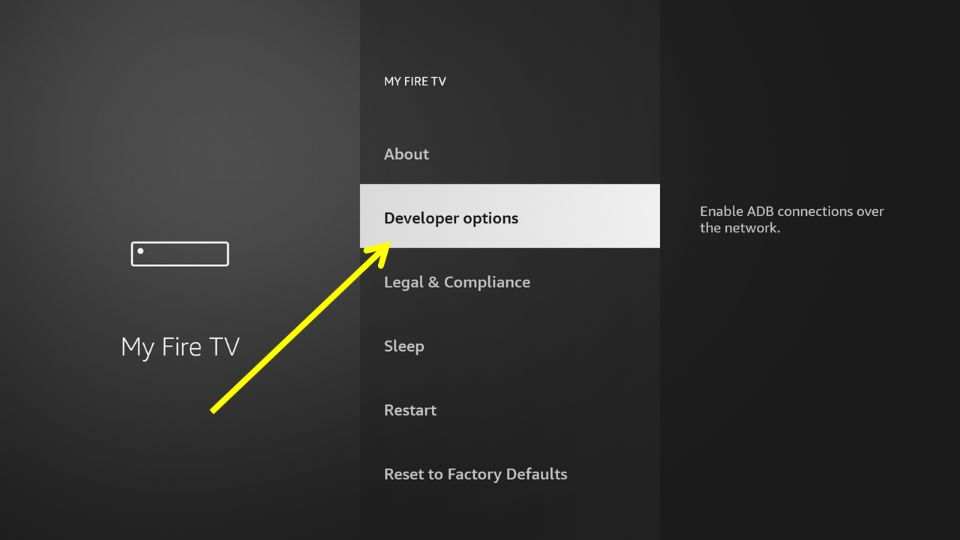
    • On the following window, click “Developer Options“.
    • On the following window, click “Developer Options".
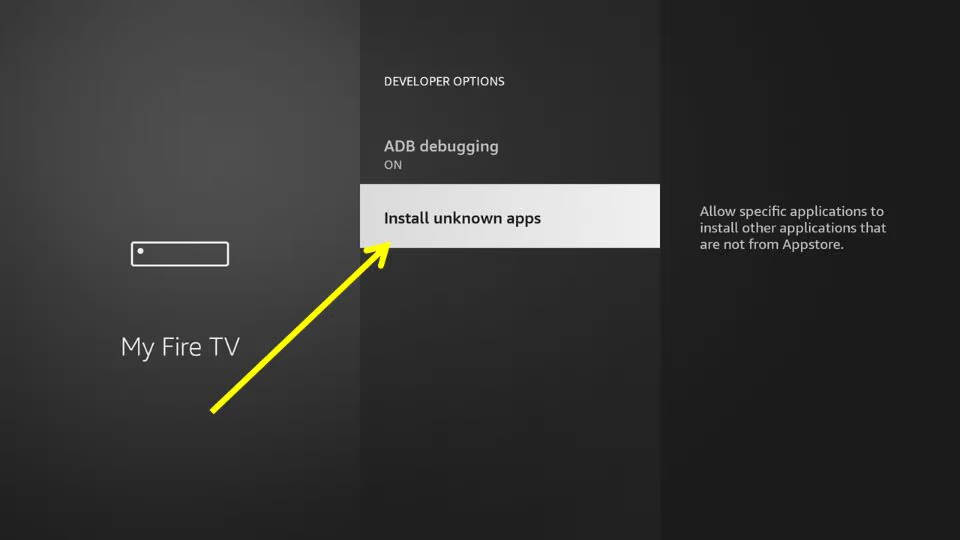
    • Next, allow the permission install unknown applications.
    • Next allow the permission install unknown applications
    •  Open downloader app and enter the URL in the search (livenettv.bz) and click Go.
    • Scroll down and click on download for android to download the APK for Live Net TV.
    • Wait for the APK to download.
    • Now Install the app, open and enjoy streaming.
    Why is it Important to use a VPN to Watch Live NetTV on FireStick?

    Using a VPN is important when watching Live NetTV on FireStick because it helps to protect your privacy and security by encrypting your internet connection. This makes it more difficult for others to track your online activity, such as what websites you visit and what streaming content you watch. 

    Additionally, a VPN can help you to access content that may be blocked in your region by routing your internet connection through a server in a different location. This can allow you to access Live NetTV and other streaming services that may otherwise not be available in your area.

    Best VPN to Watch Live NetTV on FireStick

    ExpressVPN Logo

    ExpressVPN is considered the best VPN to watch Live NetTV on FireStick for several reasons:

    • Fast speeds: ExpressVPN offers high-speed connections, which allows for smooth streaming on FireStick or other devices.
    • Wide server coverage: It has a wide network of servers, which means you can connect to a server in a location where Live NetTV is available.
    • Strong security: The VPN uses military-grade encryption to protect your online activities, ensuring your data and privacy remain secure while streaming.
    • No-log policy: ExpressVPN does not keep any logs of your online activities, which means your browsing history and data will not be tracked.
    • Easy to use: It has a user-friendly app, which makes it easy to connect to a server and start streaming Live NetTV on FireStick.

    Overall, ExpressVPN is the best VPN to use for streaming Live NetTV on FireStick because it offers fast speeds, wide server coverage, strong security, a no-log policy, and is easy to use.


    Get ExpressVPN

    How to Install ExpressVPN on FireStick?

    You can use these steps to install ExpressVPN on FireStick :

    • Download and subscribe to the premium services.
    • Enter your login information to use the VPN.
    • Choose the US server from the list of locations.
    • Go to Search on your FireStick.
    • Type Live NetTV in the input field and click enter
    • Open “Live NetTV”
    • Launch the “Live NetTV” app and log in using your credentials.

    Enjoy streaming content safely. 

    Fatima Asif

    Related Posts

    How to Install Fluxus IPTV Addons on FireStick and Android TV

    Channels Apps & IPTV

    Watch Latest Release 2024 Movies on FireStick (For Free)

    Channels Apps & IPTV

    How to Install STV Player on FireStick and Android TV

    Channels Apps & IPTV

    Watch and Download Shack TV On Firestick

    Channels Apps & IPTV
    Recent Posts
    • How to Get Dedicated IP in the UK
    • How to Get Dedicated IP in India
    • A Comprehensive Guide to Obtaining a Dedicated IP in the US
    • Setup Linksys Wireless Router with DedicatedIP Address
    • Setting Up a Dedicated IP Address on Netgear XR500

    We talk about almost everything around Amazon Fire Stick. Be it Apps, How to guides, Sports, Troubleshooting, latest news.

    Disclaimer: We may earn affiliate commissions if you decide to purchase through our links. For more details read our Ownership Disclosure.

    Facebook YouTube
    Latest Posts

    How to Get Dedicated IP in the UK

    March 12, 2024

    How to Get Dedicated IP in India

    March 12, 2024

    A Comprehensive Guide to Obtaining a Dedicated IP in the US

    March 8, 2024
    Explore by category
    • Channels Apps & IPTV
    • Dedicated IP
    • News
    • Sports Movies & Shows
    • Tips Tricks & Features
    • uncategorized

    Type above and press Enter to search. Press Esc to cancel.