



In this modern era, everyone wants convenience and variety. The media and entertainment industry has been evolving with the high rise in demand for content, so each company tries to one-up the other.
With this competition to set the next benchmark in the industry, many streaming and video-on-demand sites and applications have emerged.
Some of the giants of the industry are Netflix, HBO, and Amazon Prime, but there are several other websites that often go under the radar. One of these streaming platforms is called Comstar IPTV.
How to Install ExpressVPN on FireStick?
- Get ExpressVPN for FireStick.
- Download & Install the app on your device.
- Launch the app and connect to the US server.
- Launch Comstar TV app & start streaming.
What is Comstar IPTV?
It is a subscription-based content streaming platform that offers over 9000 video-on-demand movies and TV shows, as well as over 7300 live TV channels.
Furthermore, Comstar offers several multilingual live channels, so even those who do not speak English can participate in the streaming experience.

The Comstar IPTV app’s main content categories include journalism, sports, documentary films, live channels, kids, and many others.
The majority of the content on this app is available in 4K, HD, and SD, and it also offers excellent streaming quality.
Subscription Plans for Comstar IPTV
Before making a purchase, Comstar offers a free 48-hour trial so that users can examine the app’s functionality and TV channels. Comstar IPTV offers four different subscription plan options in addition to the free trial: monthly, three-month, bi-annual, and annual subscriptions.

One of the most popular is the $14.99 monthly subscription that includes one device per connection, 99.9% guaranteed uptime, over 10,000 international channels, Full HD and HD channels, Pay-per-view events, and all of these features.
The other three plans are explained ahead; the three-month plan costs $29.99, the bi-annual plan costs $50, and the yearly plan costs $80. These prices can vary from time to time as there are often sales and discounts.
How to get Comstar IPTV for FireStick?
The Comstar IPTV application is not officially available on the Amazon App Store, so it needs to be installed via a downloader. The steps for installing the downloader are explained below:
- Go to the main menu, and click on find.
- From there, go to the search option.
- On the search bar, type in downloader, and select the first option.
- Download the downloader application and then initiate it.
- The downloader has its own search bar, and there you can paste the following URL https://bit.ly/3HWRcFE.
- Download and install the application
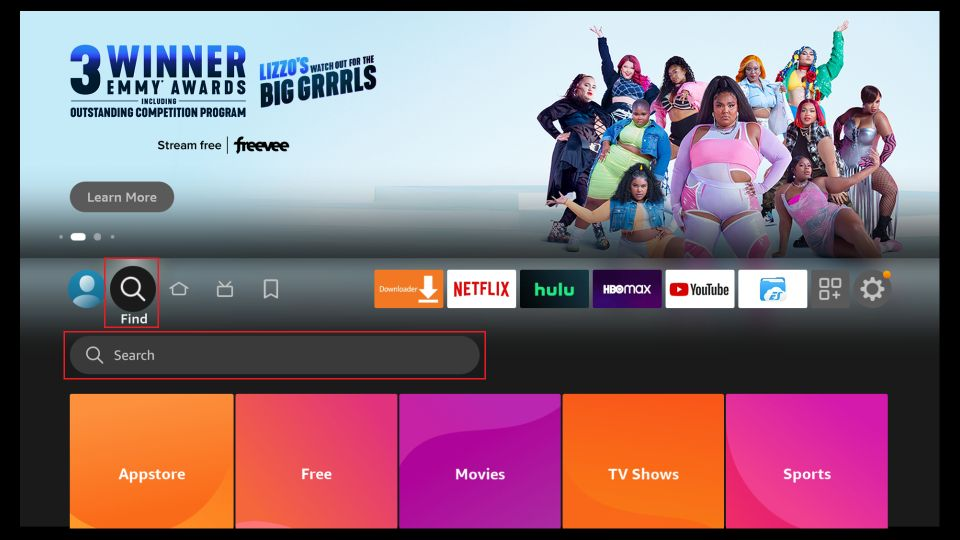
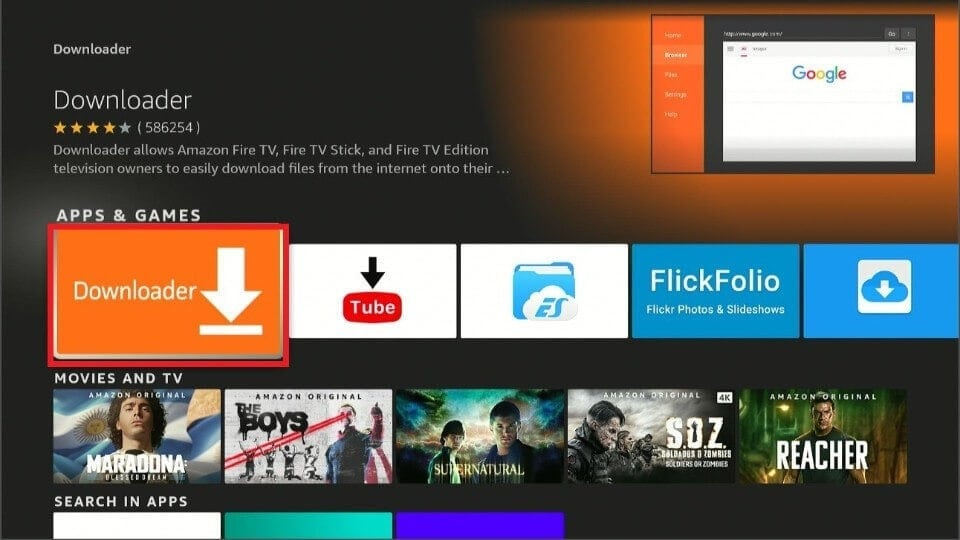
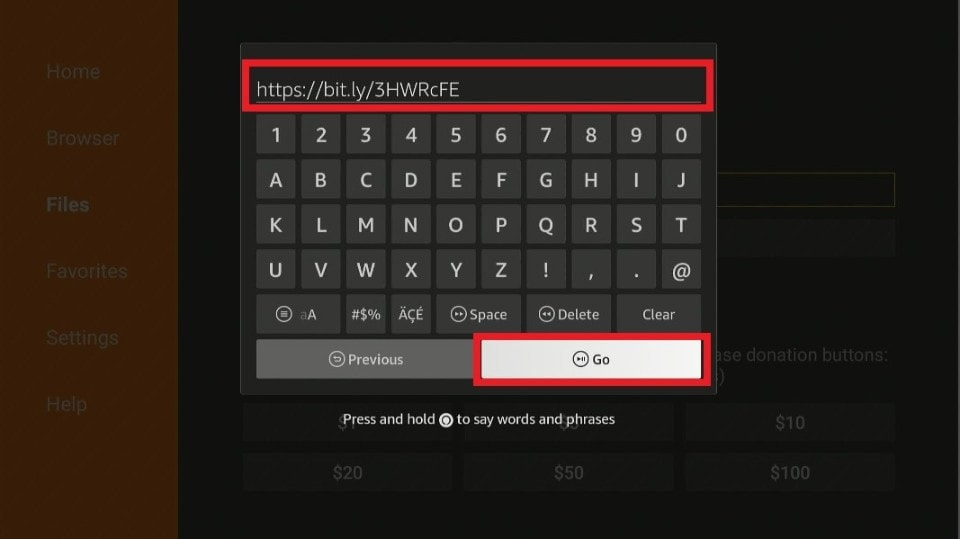
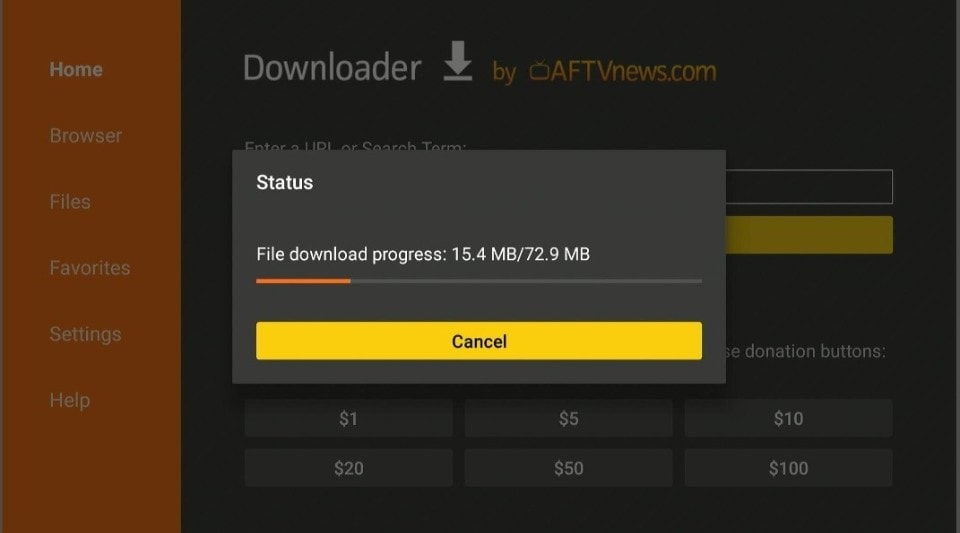
Now you can easily use Comstar TV whenever you want.
How to use Comstar IPTV on FireStick?
After the application is downloaded, you can shift the application to a more convenient place by shifting it to the home menu. There you can easily access all the content that Comstar IPTV has to offer, unknown to the common audience.
Comstar has a lot of hidden benefits, such as recording live channels to save them for later use, you can use the application for free for 24 hours to test it out, and you can tag your favorite show and channels to add them in a specific category. They also offer EPG or a TV guide for new users so that they can easily understand the interface.
Why use a VPN While Streaming Comstar IPTV?
Surfing on the internet can be rather dangerous, as the risk of getting hacked is always possible. Downloading APK files can be additionally dangerous as these files are not legal and can often be unsafe. Hackers often create duplicate APK files of genuine sites, which can be harmful to your device if downloaded accidentally.

Using a reliable VPN while engaging in such activities is the right way to prevent the invasion of viruses. Although there are a number of VPNs available in the market, only some have the convivence, reliability, and high-speed such as ExpressVPN.
The ExpressVPN application can be easily downloaded on your Amazon FireStick via downloader or the app store (if it is available for you). The steps for downloading ExpressVPN on your device are explained below:
- Go to the downloader app and type in ExpressVPN, or get it directly from the app store if it is available there.
- Install the application and select one of its subscription plans.
- Select and connect from the numerous servers available.
- Go to Comstar IPTV and watch your favorite content without the constant fear of privacy invasion.
Frequently Asked Questions
People who are interested in getting the Comstar TV application on their Amazon FireStick may need some help with getting it on their device; therefore, we have listed some common questions and their solutions.
-
Is Comstar subscription worth buying?
Absolutely! The great thing about IPTV is that they have content from numerous companies and regions. Additionally, they offer live channels, where you can stream matches, news, or any other thing, making it a one-stop-shop as almost everything is available there. It will also cost you less than the total cost of various video-on-demand sites combined.
-
What are some alternatives to Comstar IPTV?
IPTVs have been in the market for some time, so there are numerous alternatives in the market, some of which are mentioned below:
- TV Team
- Snap IPTV
- Online IPTV Pro
- Necro IPTV
- Infinity TV (for some regions)
Nevertheless, Comstar IPTV is the ideal option as it has all the facilities one may require.